
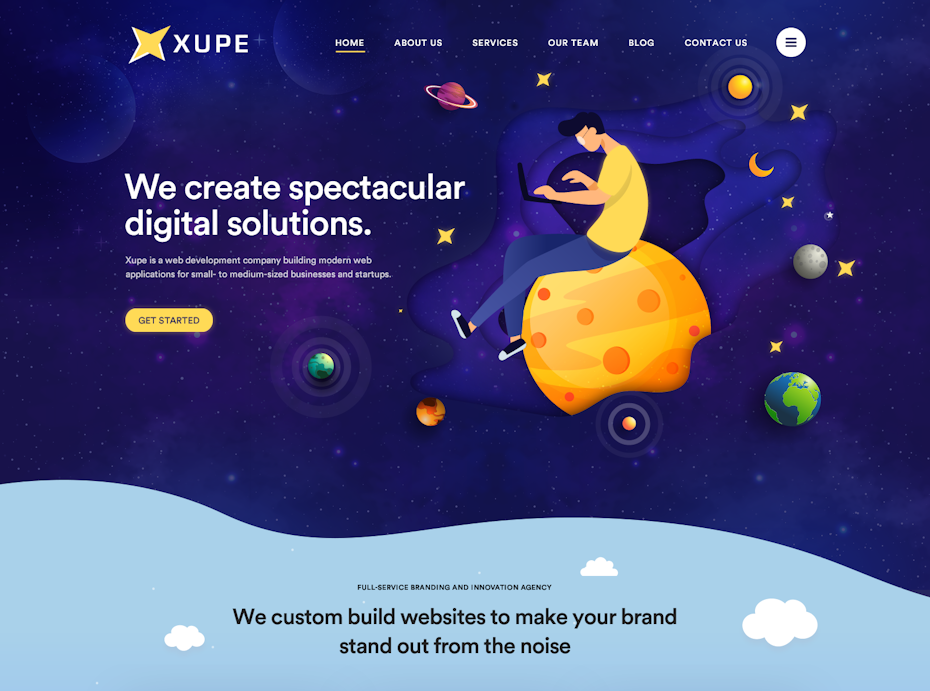
Web Design Ideas to Inspire Your Next Website
A well-designed website does more than look attractive. It helps visitors find what they need, understand what a business offers and take the next step with confidence. Whether you are creating a new site or refreshing an existing one, the best web design ideas combine visual appeal with clarity, accessibility and ease of use.
Here are some practical ideas to help you build a website that feels distinctive while working beautifully for its visitors.
Start with a clear visual identity
Choose a colour palette, typography and image style that reflect your brand. A small, consistent set of colours often feels more polished than using too many competing shades. Pair fonts carefully, too: use one distinctive typeface for headings and a highly legible one for body text.
Your design choices should support the content, not distract from it. Make sure text stands out clearly against its background, and use brand colours consistently for links, buttons and other important elements.
Make the homepage easy to understand
Visitors should be able to tell what your organisation does within a few seconds of landing on your homepage. Use a concise headline, a short supporting sentence and a prominent call to action. Avoid trying to explain everything at once; guide visitors towards the information that matters most.
A useful homepage might include:
- A clear introduction to your business or service
- A simple route to key pages
- Highlights of your main products or services
- Testimonials, reviews or other trust-building details
- A clear next step, such as making an enquiry or browsing products
Use whitespace to create focus
Whitespace is the empty space around text, images and other elements. It gives a page room to breathe, makes information easier to scan and helps important content stand out. Whitespace does not have to be white; it simply means leaving enough space between elements.
Try increasing the spacing between sections, keeping paragraphs reasonably short and avoiding crowded layouts. A simpler page can often communicate more effectively than one filled with decorative details.
Design for mobile from the beginning
People browse on phones, tablets, laptops and desktop computers, so your website should adapt to different screen sizes. Rather than treating the mobile layout as an afterthought, plan how the content will work on a small screen from the start.
Use flexible layouts, readable text and buttons that are comfortable to tap. Check that navigation menus are easy to use and that important information is not hidden or awkward to reach on mobile devices.
Choose imagery with purpose
Strong photography and illustrations can give a website personality, explain a product or help visitors picture the people behind a business. Choose images that are relevant to the page and consistent with your brand. Original photography can make a site feel more personal, while carefully selected illustrations can add a distinctive visual style.
Keep image files appropriately sized so they do not slow down the site. Add meaningful alternative text to images that convey information, and use empty alternative text for purely decorative images where appropriate.
Make navigation straightforward
Visitors should not have to guess where to find essential information. Use familiar, descriptive labels in your navigation and keep the main menu focused. If your site has many pages, group them into logical sections and consider adding breadcrumbs or a useful search feature.
Consistency matters: keep navigation in predictable places and make it clear how visitors can return to the homepage or move between related sections.
Add subtle movement, not distractions
Animation can make a website feel more responsive. A gentle hover effect, a smooth menu transition or a small reveal as someone scrolls can add polish. But too much movement may distract visitors, affect performance or make the site uncomfortable to use.
Keep animations brief and purposeful. Respect visitors’ device settings for reduced motion, and ensure that essential information is available without animation.
Make accessibility part of the design
An accessible website is easier for more people to use. Build layouts that work with a keyboard, use clear heading structures and provide sufficient colour contrast. Make sure form fields have descriptive labels and that links explain where they lead.
Accessibility is not just a technical checklist. It also means writing in plain language, making content easy to scan and avoiding design choices that rely on colour alone to communicate meaning.
Keep performance in mind
A beautiful design should not come at the cost of a slow experience. Large images, unnecessary effects and excessive scripts can make pages take longer to load. Optimise images, use only the features you need and test pages on both fast and slower connections.
Fast-loading pages help visitors reach the content they came for, particularly when they are browsing on a mobile device.
Give every page a clear purpose
Before designing a page, decide what visitors should learn or do there. A service page might explain the benefits of an offer and invite people to enquire. A product page might focus on key features, pricing and a straightforward way to buy.
Use clear calls to action, but avoid overwhelming visitors with too many competing buttons. Each page should make the next step feel natural.
Bring your web design ideas together
The strongest web design ideas are not simply trends or visual effects. They are thoughtful choices that help visitors understand, navigate and trust your website. Begin with your audience and goals, create a consistent visual style, and make usability part of every design decision.
With a clear plan and attention to detail, your website can look distinctive while giving every visitor a smooth and useful experience.
8 Web Design Tips for a Clear, Accessible and User-Friendly Website
- Keep navigation simple and clear.
- Use a consistent colour palette.
- Choose readable fonts and sizes.
- Make pages work well on mobile.
- Leave plenty of white space.
- Use clear, descriptive headings.
- Add strong calls to action.
- Check contrast for accessibility.
Keep navigation simple and clear.
Keep your website navigation simple and clear so visitors can find what they need without having to guess. Use familiar, descriptive labels, group related pages logically and keep the main menu focused on the most important sections. Consistent navigation makes the site easier to use on every device and helps visitors move smoothly towards the information or action they are looking for.
Use a consistent colour palette.
Using a consistent colour palette helps your website feel polished and recognisable. Choose a small selection of colours that reflect your brand, then use them consistently for backgrounds, headings, links and buttons. Make sure there is enough contrast between text and background so the content remains easy to read, and reserve brighter accent colours for important details or calls to action.
Choose readable fonts and sizes.
Choose fonts that are clear and comfortable to read across different devices. Use a simple typeface for body text, with a suitable size and enough spacing between lines to make paragraphs easy to follow. Headings can use a more distinctive font, but keep the overall selection consistent and check that text remains legible on smaller screens.
Make pages work well on mobile.
Designing pages to work well on mobile means making content easy to read, navigate and use on a smaller screen. Use a responsive layout that adapts to different devices, keep text legible without zooming, and make buttons large enough to tap comfortably. Simplify menus, prioritise the most important information and check that images load quickly and scale properly. Test your pages on a range of screen sizes to make sure visitors can complete key tasks with ease.
Leave plenty of white space.
Leave plenty of white space—the open space around text, images and other elements—to help your website feel calm and easy to navigate. Giving content room to breathe makes pages easier to scan, draws attention to important information and helps visitors focus on what matters. White space doesn’t have to be white: it can be any uncluttered area that creates balance and improves readability.
Use clear, descriptive headings.
Use clear, descriptive headings to help visitors understand what each section is about and quickly find the information they need. Write headings that are specific and meaningful rather than vague, and organise them in a logical order, with one main heading followed by subheadings. This makes your content easier to scan and improves accessibility for people using screen readers.
Add strong calls to action.
Add strong calls to action to guide visitors towards the next step, whether that is making an enquiry, booking a service or buying a product. Use clear, action-focused wording such as “Get a quote” or “Shop now”, and make buttons easy to spot without overwhelming the page. Place each call to action where it feels relevant, so visitors know exactly what to do next.
Check contrast for accessibility.
Check contrast for accessibility by choosing text and background colours that are easy to distinguish. Strong contrast helps people with low vision or colour-vision deficiencies read your content, and makes it easier for everyone to use your site in different lighting conditions. Pay particular attention to body text, links, buttons and form labels, and test colour combinations against recognised accessibility guidelines.