
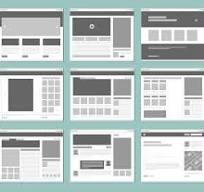
Web Layouts: How to Create Clear, Effective Websites
A web layout is the way content and interactive elements are arranged on a webpage. It shapes how people move through a site, what they notice first and how easily they can find the information they need. A thoughtful layout can make a website feel intuitive and welcoming; a confusing one can send visitors elsewhere.
Good web layouts balance appearance with usability. They organise content into a clear structure, adapt to different screen sizes and make key actions easy to find.
Why web layout matters
Visitors often make quick judgements about a website. A clear layout helps them understand what the site offers and where to go next. It can also support business goals, such as encouraging someone to make a purchase, submit an enquiry or read more about a service.
A well-planned layout can:
- Make information easier to scan and understand
- Give pages a consistent, professional appearance
- Guide visitors towards useful content and actions
- Improve usability across mobiles, tablets and desktop computers
- Make websites more accessible to a wider range of people
Common types of web layout
Single-column layout
A single-column layout places content in one main vertical stream. It works well for articles, landing pages and mobile-first experiences because it is straightforward to follow. Headings, images and calls to action can be arranged in a clear sequence.
Multi-column layout
Multi-column layouts divide a page into sections, such as a main content area alongside a sidebar. They are useful for news sites, blogs and product pages, but the columns need to be prioritised carefully. On smaller screens, they usually need to stack vertically.
Grid layout
A grid arranges items in rows and columns. It is often used for product listings, image galleries and collections of articles. Grids help create visual order, while allowing each item to be presented consistently.
Card-based layout
Card layouts present related information in separate, self-contained blocks. A card might include an image, a heading, a short description and a link. Cards are flexible and easy to scan, but too many can make a page feel crowded.
Asymmetrical layout
An asymmetrical layout uses an intentionally uneven arrangement of elements to create visual interest. It can give a brand a distinctive feel, provided that the content remains easy to follow and the design works across screen sizes.
Key principles of an effective layout
Establish a clear visual hierarchy
Visual hierarchy helps visitors understand what matters most. Size, colour, spacing and position can draw attention to important headings, messages and actions. Use these cues consistently so people can scan the page without having to work out what to look at first.
Use a consistent grid and spacing
A grid provides an underlying structure for aligning content. Consistent spacing between sections and elements makes a page feel organised and helps prevent text, images and buttons from appearing cramped or disconnected.
Make navigation easy to understand
Navigation should use familiar labels and appear in predictable places. Keep the main menu focused on the most important sections, and make it easy for visitors to return to the homepage or move between related pages.
Design for different screen sizes
A responsive layout adjusts to the device being used. Rather than simply shrinking a desktop design, consider how content should reflow on smaller screens. Text should remain readable, buttons should be easy to tap, and horizontal scrolling should be avoided for ordinary page content.
Consider accessibility
Accessible layouts support people with different needs, devices and ways of browsing. Use clear heading levels, sufficient colour contrast and descriptive link text. Do not rely on colour alone to communicate meaning, and ensure that pages can be navigated using a keyboard.
Planning a web layout
- Understand the audience: Consider who will use the page and what they need to accomplish.
- Set a clear purpose: Decide what the page should communicate and what action visitors should be able to take.
- Organise the content: Group related information and put the most important material where it is easy to find.
- Create a wireframe: Sketch the page structure before focusing on colours, fonts and decorative details.
- Test on real devices: Check how the layout behaves on different screen sizes and with keyboard navigation.
- Improve based on feedback: Use testing and visitor feedback to identify confusing sections or unnecessary steps.
Common layout mistakes to avoid
Even an attractive design can be difficult to use if its structure is unclear. Common problems include overcrowding a page with competing elements, using inconsistent spacing, hiding important information and making calls to action hard to spot.
It is also worth avoiding layouts that depend on large blocks of text without headings, tiny controls that are difficult to tap or visual effects that distract from the content. Simplicity does not mean a page has to look plain; it means each element has a clear purpose.
Conclusion
An effective web layout makes content easier to understand and actions easier to take. By focusing on hierarchy, consistency, responsive behaviour and accessibility, you can create pages that work well for visitors on a wide range of devices. Start with the needs of your audience, build a clear structure and refine the design through testing.
Essential FAQs on Web Layouts: Understanding, Choosing, and Designing User-Friendly and Responsive Designs
- What is a web layout?
- What are the most common types of web layout?
- How do I choose the right layout for my website?
- What makes a web layout user-friendly?
- How do I make a web layout responsive on mobile devices?
- Which tools can I use to design a web layout?
What is a web layout?
A web layout is the way text, images, menus and other elements are arranged on a webpage. It creates the page’s structure and helps visitors understand the content, find what they need and navigate the site. A good web layout is clear, easy to use and adapts to different screen sizes, from mobile phones to desktop computers.
What are the most common types of web layout?
The most common types of web layout include single-column designs, which present content in a straightforward vertical flow; multi-column layouts, which organise content into areas such as a main section and sidebar; grid layouts, often used for products or image galleries; and card-based layouts, which display information in separate, scannable blocks. Some websites also use asymmetrical layouts to create a more distinctive look. The best choice depends on the content, audience and devices people use to visit the site.
How do I choose the right layout for my website?
Choose a layout that reflects your website’s purpose, content and audience. Consider what visitors need to find or do, then organise the page so the most important information and actions are easy to spot. For example, a single-column layout works well for articles, while a grid can make products or portfolios easier to browse. Make sure the design is responsive, accessible and simple to navigate, and test it on different devices before deciding it is right.
What makes a web layout user-friendly?
A user-friendly web layout is clear, consistent and easy to navigate. It helps visitors find important information quickly through logical content structure, readable text, accessible colour contrast and clearly labelled links and buttons. It should also adapt smoothly to different screen sizes, work well with keyboard navigation and avoid clutter or unnecessary distractions.
How do I make a web layout responsive on mobile devices?
To make a web layout responsive on mobile devices, use a flexible grid and relative units so content can adapt to different screen widths. Add the viewport meta tag, then use CSS media queries to adjust columns, spacing, typography and navigation for smaller screens. Make images scale within their containers, keep text readable, and ensure buttons and links are large enough to tap comfortably. Test the page on a range of screen sizes, and check that visitors do not need to scroll horizontally or zoom in to use it.
Which tools can I use to design a web layout?
You can design a web layout using tools such as Figma, Adobe XD and Sketch, which are popular for creating wireframes and interactive prototypes. For a simpler starting point, try Canva or a website builder with ready-made templates. Choose a tool that suits your experience and project, and check that it lets you preview how the layout will look on mobile, tablet and desktop screens.