
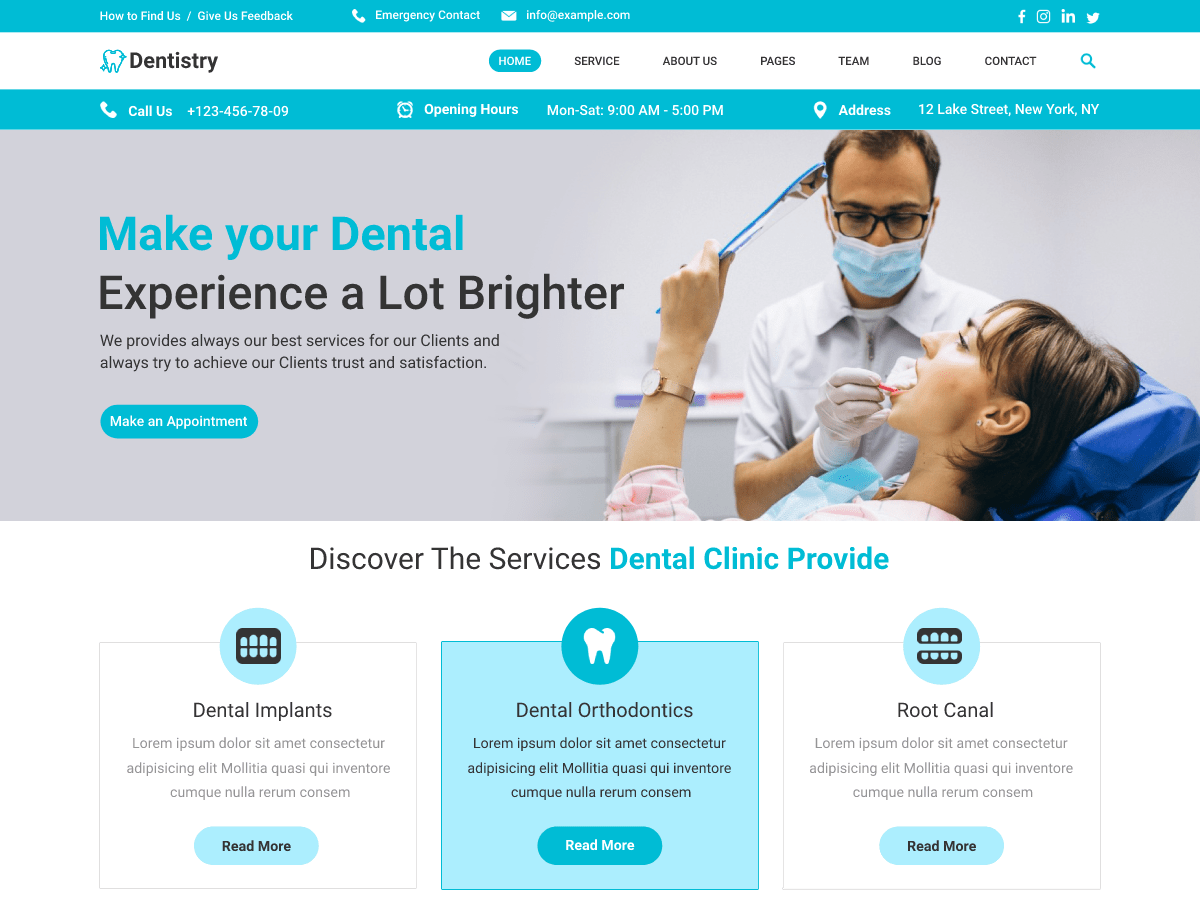
Dental Website Design: Creating a Better Experience for Patients
A dental practice website is often the first place a prospective patient goes to find out who you are, what you offer and how to book. A well-designed site should do more than look professional: it should make essential information easy to find, build confidence and help visitors take the next step.
Whether you run an independent practice or manage a group of clinics, thoughtful dental website design can support a smoother experience for patients and staff alike.
Make a strong first impression
Visitors should be able to understand what your practice does within moments of arriving on your website. Use clear headings, concise language and consistent branding. Professional photography of the practice and team can help the site feel welcoming, while a simple layout makes it easier to focus on the information that matters.
Avoid crowding the homepage with too many messages. Highlight key details such as your location, opening hours, contact information and appointment options. If you offer both NHS and private treatment, explain the options clearly so visitors know what to expect.
Design for mobile first
Many people search for local dental services on a mobile phone. Your website should therefore work just as well on a small screen as it does on a desktop computer. Text should be easy to read, menus simple to use and important buttons large enough to tap comfortably.
Check that phone numbers can be tapped to call, maps are straightforward to open and forms are manageable on mobile. A slow or awkward mobile experience can make it harder for a potential patient to get in touch.
Make booking and contact simple
Every page should make it clear how a visitor can contact the practice or request an appointment. Depending on how your practice operates, useful options may include an online booking system, a contact form, a telephone number or a link to request a call back.
Keep forms short and ask only for information you need at that stage. Explain what happens after someone submits a form, and provide an alternative contact method for people who prefer not to use it. If online booking is available, make the process clear and easy to complete.
Build trust with useful information
Patients may be comparing practices or feeling uncertain about treatment. Helpful, straightforward information can make it easier for them to decide what to do next. Consider including:
- Profiles of dentists and other members of the team
- Practice location, access information and opening hours
- Details of treatments and who they may be suitable for
- Clear information about fees and payment options
- Answers to common questions, such as what to expect at a first appointment
Keep treatment descriptions accurate and easy to understand. Avoid promises or language that could give patients unrealistic expectations. Dental advertising should be truthful and not misleading, and should follow relevant professional and advertising requirements in the UK.
Consider accessibility
An accessible website is easier for more people to use, including people with visual, hearing, motor or cognitive impairments. Use readable text, strong colour contrast, descriptive link wording and useful alternative text for images. Make sure the site can be navigated using a keyboard, and give form fields clear labels.
Accessibility should be considered from the beginning of a design project rather than added as an afterthought. It can improve the experience for all visitors, not only those who use assistive technology.
Protect patient information
Dental websites may collect personal information through contact, enquiry or booking forms. Explain how submitted information will be used and stored, and make sure data-handling practices meet applicable UK data protection requirements, including the UK GDPR and Data Protection Act 2018. Use secure connections and collect only the information needed for the purpose.
Keep the website fast and up to date
Page speed affects usability, particularly for visitors using mobile data. Optimised images, reliable hosting and well-maintained software can help keep a site responsive. Regularly review opening hours, staff profiles, fees, treatment details and contact information so visitors are not relying on outdated content.
A website that supports your practice
Effective dental website design brings together clear communication, accessible layouts, useful content and simple ways to get in touch. By focusing on what patients need at each stage, your website can make a positive first impression and provide a practical service long after the first visit.
8 Essential Tips for Effective Dental Website Design
- Make appointment booking easy to find.
- Use clear, accessible navigation.
- Show fees and payment options upfront.
- Include staff profiles and qualifications.
- Use real, reassuring clinic photos.
- Make the site work well on mobile.
- Add clear contact details and opening hours.
- Use accessible colours, text and forms.
Make appointment booking easy to find.
Make appointment booking easy to find by placing a clear, prominent button—such as “Book an appointment”—in the website header and on key pages. Make sure it works well on mobile, takes patients straight to the booking options, and explains what to do if they would rather call the practice. A simple booking journey helps visitors take the next step without having to search for contact details.
Use clear, accessible navigation.
Use clear, accessible navigation to help patients find what they need without frustration. Organise pages into familiar categories, use descriptive labels such as “Treatments”, “Fees” and “Contact us”, and keep the menu consistent across the site. Make sure it works well on mobile devices and can be used with a keyboard or screen reader. A simple, well-structured menu helps every visitor quickly find key information and book or contact your practice.
Show fees and payment options upfront.
Show fees and payment options upfront to help patients understand the likely cost of treatment before they get in touch. Present prices clearly, explain what is included and note when costs may vary depending on an individual assessment. If you offer payment plans or finance, outline the main terms and eligibility requirements in plain language. Being transparent helps visitors compare their options, plan ahead and feel more confident about booking an appointment.
Include staff profiles and qualifications.
Include staff profiles and qualifications to help patients get to know the people behind your practice and feel more confident about booking. Introduce each team member with a friendly, professional photo, their role, relevant qualifications and areas of expertise. Keep the wording clear and welcoming, and make sure all details are accurate and up to date. A personal touch—such as a short note about their approach to patient care—can also help your practice feel more approachable.
Use real, reassuring clinic photos.
Use real, reassuring photos of your clinic to help prospective patients feel more at ease before they visit. Show welcoming spaces, treatment rooms and friendly team members in a natural, professional way, so people know what to expect and can begin to feel comfortable with your practice. Make sure everyone pictured has given permission, and use clear, high-quality images that load quickly on mobile devices.
Make the site work well on mobile.
Make sure your dental website works smoothly on mobile, as many people search for a nearby practice using their phone. Use a responsive layout with readable text, clear navigation and buttons that are easy to tap. Make key details—such as your phone number, opening hours, location and appointment booking options—quick to find, and check that forms are simple to complete on a small screen. A fast, easy-to-use mobile site helps prospective patients get the information they need and contact your practice without frustration.
Add clear contact details and opening hours.
Make it easy for patients to contact your practice by displaying your telephone number, email address and location prominently, ideally on every page. Include clear opening hours and keep them up to date, noting any differences for weekends or bank holidays. On mobile, make phone numbers tap-to-call and provide a link to directions, so patients can quickly get in touch or plan their visit.
Use accessible colours, text and forms.
Use accessible colours, text and forms to make your dental website easier for everyone to use. Choose strong colour contrast so text and buttons are easy to see, use clear, readable fonts and break up information with descriptive headings. Give every form field a clear label, explain any errors in plain language and ensure forms can be completed using a keyboard as well as a touchscreen. These small design choices can make it easier for patients to find information and get in touch.